


Wix has closed the gap with WordPress and other builders when it comes to SEO — Google’s own John Mueller has confirmed that no mainstream CMS is treated differently in search, provided it’s set up correctly. The catch is that “set up correctly” still takes deliberate work. A good template and a nice logo won’t get you found on Google; a proper SEO process will.
Below are the 10 steps we run through with every Wix client, in the order we’d tackle them.
1. Get your technical foundations right first
Before touching keywords or content, confirm the basics are in place:
- Your domain is connected and verified in the Wix dashboard.
- Your site is set to be indexable (Settings → SEO → check it isn’t hidden from search engines).
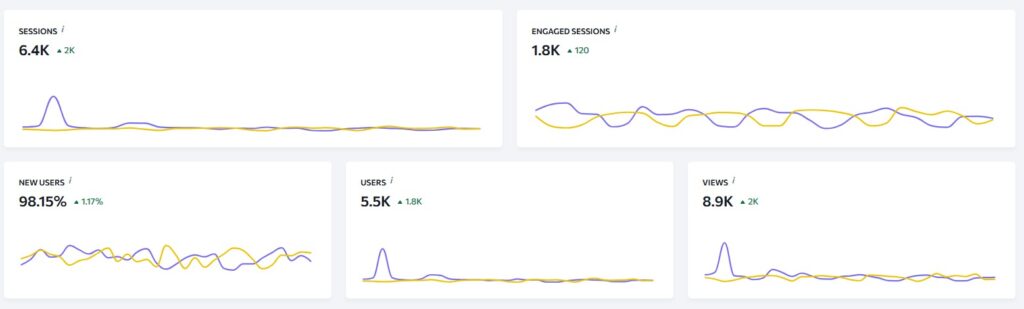
- Google Search Console and Google Analytics are connected, so you can actually measure what happens next.
- Your sitemap (auto-generated by Wix) has been submitted to Search Console.
Skipping this step is the single most common reason a new Wix site fails to appear on Google at all — it’s not a ranking problem, it’s an indexing problem.
2. Do proper keyword research before writing anything
Every page should target one primary keyword and a handful of closely related terms — not a list of ten unrelated phrases crammed in. Use Wix’s built-in SEO tools (which integrate with Semrush) or a standalone tool to find:
- Search volume and difficulty for your target terms
- The intent behind the keyword (is someone looking to buy, learn, or compare?)
- Related long-tail phrases you can naturally work into subheadings
For local businesses, include your town or region in at least one keyword variant, for example “Wix web designer in Manchester” rather than just “Wix web designer.”
3. Write unique title tags and meta descriptions for every page
This is where a lot of Wix sites lose easy wins. Go into each page’s individual SEO settings and write a title tag and meta description that:
- Includes the target keyword naturally, ideally near the front
- Stays under roughly 60 characters for the title and 155 for the description, so it doesn’t get truncated in search results
- Gives the searcher a genuine reason to click, rather than just repeating the page’s H1
Never leave Wix’s auto-generated defaults in place across multiple pages — duplicate titles and descriptions confuse search engines and dilute your rankings.
4. Fix your URL structure and site hierarchy
Wix generates reasonably clean URLs by default, but it’s worth checking manually:
- Keep URLs short and descriptive (
/wix-seo-guide/rather than/post-2847-final-version) - Organise pages into a logical hierarchy — service or category pages linking down to more specific subpages
- Avoid orphan pages that aren’t linked from anywhere else on the site
A clear structure helps both users and search engine crawlers understand what your site is about and how pages relate to one another.
5. Use the Wix SEO Setup Checklist properly — don’t just tick it off
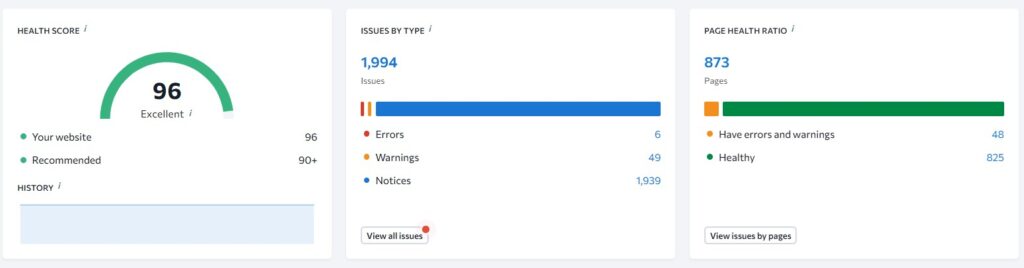
Under Marketing & SEO → SEO Tools, Wix’s guided checklist walks you through the essentials: domain connection, indexing, sitemaps, and basic on-page settings. Treat it as a starting point rather than the finish line. Once it’s complete, go page by page and check:
- Every page has a unique H1
- Headings follow a logical order (H1 → H2 → H3), not styled text pretending to be a heading
- Alt text is added to every meaningful image, describing what’s actually in the image
6. Create original, genuinely useful content
Search engines reward pages that demonstrate real experience, not just repackaged advice. For each page or blog post:
- Answer the actual question a searcher has, with specifics — numbers, examples, screenshots — rather than vague statements like “leverage the right tools”
- Avoid duplicating content across similar pages or blog posts; each one should serve a distinct purpose
- Update older content periodically rather than only publishing new pages, since freshness is a ranking signal
7. Improve page speed and Core Web Vitals
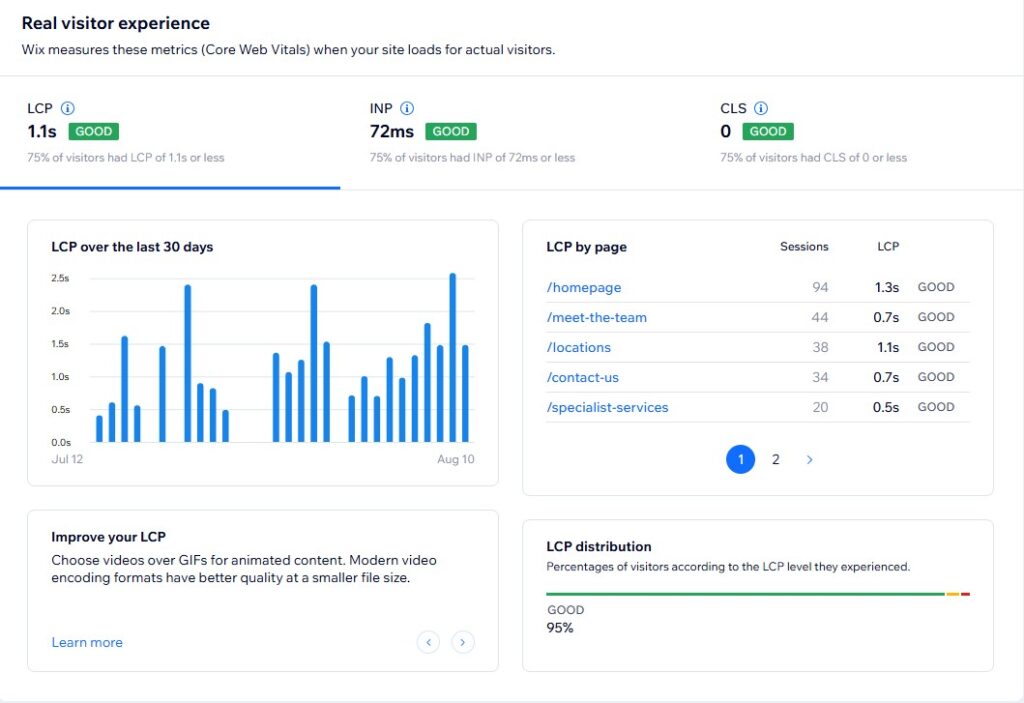
Wix handles a lot of this automatically (image compression, CDN delivery, caching), but it’s still worth checking your own numbers:
- Test key pages with Google PageSpeed Insights and aim for 90+ on both mobile and desktop
- Compress or resize any oversized images you’ve uploaded manually
- Avoid overloading pages with heavy embeds, custom code (Velo), or unnecessary apps that slow rendering
Wix’s Site Speed Dashboard (Site & Mobile App → Website & SEO → Site Speed) is the quickest way to spot problems.
8. Add structured data where it’s genuinely useful
Wix automatically adds some schema markup, but for content-heavy pages it’s worth adding your own via the custom code or SEO settings panel — particularly:
- FAQ schema on pages that answer common questions
- Article schema on blog posts
- Local business schema if you serve a specific area
Structured data won’t guarantee a rich result, but it gives Google a clearer, more explicit understanding of your content, which can help.
9. Build internal links and earn real backlinks
Two separate things, both essential:
- Internal linking: link relevant pages to one another within your body content (not just navigation menus), so authority and relevance flow through the site.
- Backlinks: earn links from genuinely relevant sites — local directories, industry blogs, guest posts, partner businesses. A handful of relevant, earned links will do more for your rankings than a large number of low-quality ones.
A Google Business Profile listing is also worth setting up if you serve local customers, since it supports both map-pack visibility and general search authority.
10. Monitor, measure, and keep going
SEO isn’t a one-off task. Once the above is in place:
- Check Search Console monthly for indexing errors, new keyword opportunities, and pages losing visibility
- Track which pages and keywords are actually driving traffic in Analytics
- Revisit and refresh older content rather than only publishing new pages
Treat this list as a cycle rather than a checklist you complete once — the sites that keep ranking well are the ones that keep doing steps 6 to 10 consistently.
FAQs
Is Wix actually good for SEO in 2026? Yes. Wix sites can rank competitively provided the fundamentals — indexing, unique metadata, page speed, and quality content — are properly configured. The platform itself is not a limiting factor for most businesses.
How long does it take to rank a Wix website? Typically three to six months for meaningful movement on moderately competitive keywords, and longer for highly competitive terms, depending on your site’s age, content quality, and backlink profile.
Do I need a Wix SEO app or premium plan to rank well? No. The core SEO settings needed to rank are available on Wix’s standard plans. Premium tools like the AI SEO Assistant can speed up the process but aren’t a requirement.
Want a second opinion on your Wix site’s SEO setup? Book a free SEO call and we’ll walk through what’s holding your rankings back.